A map in Dungeons is a picture laid on the floor of the 3D table: a battle map, a floor plan, a world map. Walls, doors and tokens stand on top of it.
Only the host adds and moves maps.
Add a map picture
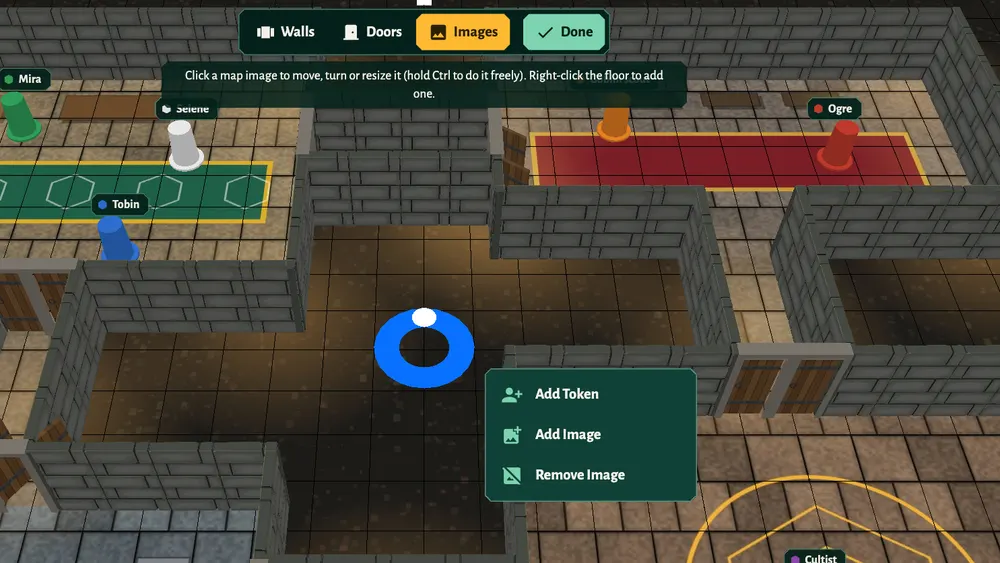
- Right-click the floor where the map should go (on a phone or tablet, press and hold).
- Choose Add Image.
- Pick a map from the library. Open a folder to see what's inside.
On Silver and Gold you can upload your own maps with + New Plane (PNG, JPEG or GIF, up to 1 MB). Bronze, the free plan, has the starter maps in the library; Silver and Gold add the premium ones. See pricing.
Move, turn and resize it
- Click Edit Map on the right, then Images in the bar at the top.
- Click the map picture. Handles appear on it.
- Drag to move it, use the handles to turn or resize it. Hold Ctrl to turn and resize freely instead of in steps.
- Click Done.
To delete a picture, right-click it and choose Remove Image.
You can lay several pictures side by side to build a bigger area.
Make the map work with fog of war
A picture is only paint on the floor: tokens can see and walk across its drawn walls. Trace the walls with Edit Map, Walls, and add doors, so that fog of war and movement follow the map. See walls and doors.
Rooms: one map per location
Each campaign has rooms, and each room is its own map with its own walls, doors and tokens: the tavern, the road, the dungeon.
- Open Menu on the right and choose Rooms.
- Click + New Room, give it a name, and create it.
- Click a room in the list to go there.
When the party moves on, go to the next room and click Focus Players on the right. It moves every player's camera to your view and your current room.
How many rooms you can have depends on the host's plan: 5 per campaign on Bronze, 10 on Silver and 50 on Gold.
Grid size
The grid is 1 square = 5 feet. To change how many squares the table has, open Menu, Settings and set Grid Width and Grid Height.