
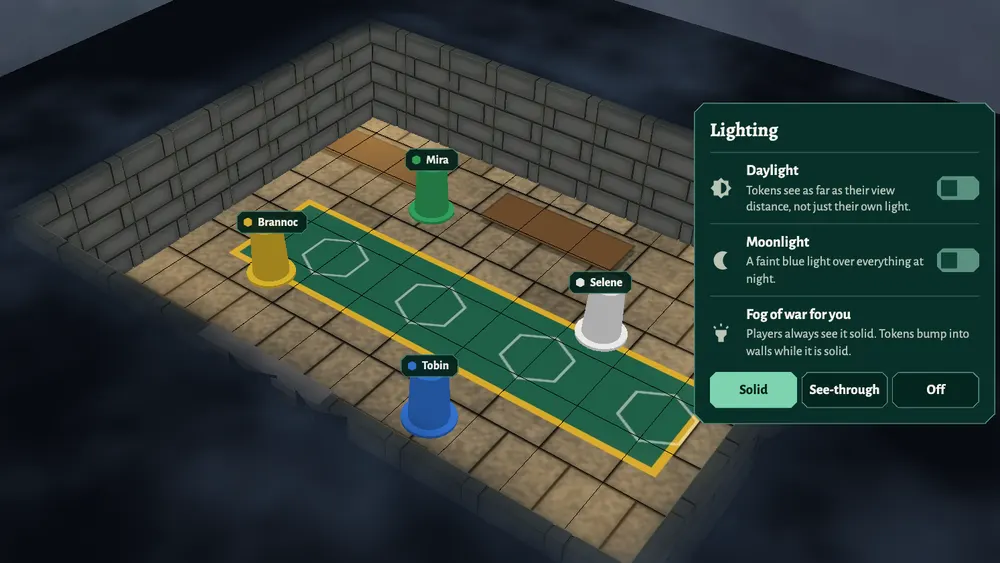
Fog of war is on in every room of Dungeons. You don't need to paint it, reveal it or turn it on. Each player sees what their own token can see, and the fog covers the rest.
How it works
- Sight comes from the token. A player looks through the eyes of a token they own. Everything that token has a clear line to is visible; everything else is under fog.
- Walls and closed doors block sight. Open a door and the room behind it comes into view. Close it and the fog rolls back in. See walls and doors for how to build them.
- Monsters out of sight are hidden. Tokens that the player's token cannot see are not drawn for that player, so an ambush stays an ambush.
- The fog closes behind them. Players see only what their token sees right now. When it moves on, the room it left goes back under the fog.
How far a token can see
- Right-click the token and choose Edit.
- Set View Distance (feet). New tokens see 60 feet.
- Click Save to This Token.
For an outdoor scene or a well-lit hall, open Lighting on the right and turn on Daylight: tokens then see much further than their view distance. Walls and closed doors still block sight in daylight. Moonlight adds a faint blue light over everything at night.
What players see
- Your player opens the room. Their tokens show as portraits along the bottom of the screen.
- They click a portrait to see through that token's eyes. The camera moves to it and the fog is drawn from where it stands.
- As they drag the token, the fog updates around it.
Players always see the fog solid, and their tokens cannot walk through walls or closed doors. To give a player a token, see tokens.
What the host sees
As the host you see the whole map by default, with the fog laid over it so you can tell what your players can see. Change this under Lighting, Fog of war for you:
- Solid: exactly what a player sees. Your tokens also bump into walls, like theirs.
- See-through: the fog is see-through so you can see what's under it (the default). Places you have already seen through a token's eyes get a lighter veil, so you can tell where the party has been. That memory is kept in your browser only and is gone when you reload the page.
- Off: no fog at all.
Only you see this setting; it never lifts the fog for your players.
On a slow computer or phone
Open Menu, Settings. Under Fog of War, Simple draws a flat fog instead of the soft drifting one, and the 2D View button on the right gives a flat view from above, which is lighter still.